DKIM Authentication of Inbound Mail
Source: docs.titanhq.com Product: SpamTitan Imported content type: docs_page Product stream: legacy
DKIM Authentication of Inbound Mail
Section titled “DKIM Authentication of Inbound Mail”DKIM (DomainKeys Identified Mail) is a method to validate the authenticity of email messages using public-key cryptography. Simply, it is a way to verify that an email sender is who they say they are. Its purpose is to prevent email spoofing.
DKIM is a development of ‘DomainKeys’ from Yahoo and ‘Identified Internet Mail’ from Cisco, hence the name DKIM.
Go to System Setup > Mail Authentication > DKIM Authentication to enable and configure DKIM authentication for inbound mail.
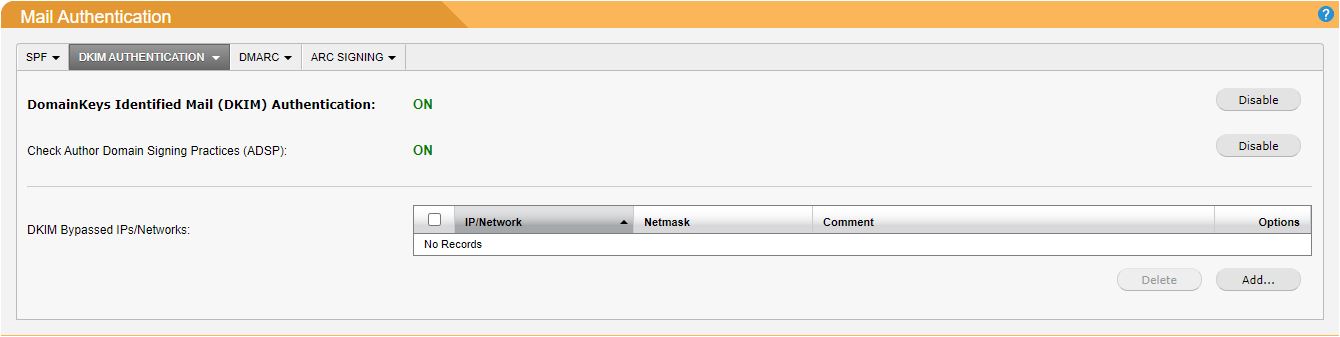
Author Domain Signing Practices (ADSP) is an optional extension to DKIM authentication which allows for a domain to publish the signing practices it adopts when relaying mail on behalf of associated authors. Click Enable opposite Check Author Domain Signing Practices (ADSP): to enable this extension.
IP addresses and networks can allow DKIM authentication by adding them to the DKIM Bypassed IPs/Networks list.
-
To add a list entry, click Add… and the DKIM window displays. Using the table below as a reference, complete the fields. Click Save to save this entry.
-
To edit an existing entry, click the edit
 icon in the Options column and the DKIM dialog box displays. Using the table below as a reference, edit the fields. Click Save to save changes.
 -
To delete an entry, click the delete
 icon in the Options column.
Field | Description |
|---|---|
IP/Network: | Enter an individual IP address or network range to bypass DKIM checks |
Netmask: | Select the netmask for the specified IP address. Individual IPv4 addresses will have a /32 (255.255.255.255) netmask. |
Address Type: | IPv4 (default) or IPv6. |
Comment: | Optional comment for this entry. |