Importing Domains
Source: docs.titanhq.com Product: SpamTitan Imported content type: docs_page Product stream: legacy
Importing Domains
Section titled “Importing Domains”The Import Domains feature allows you to bulk import domains into SpamTitan Gateway from a CSV file. This is useful if you have several domains to bring into SpamTitan. You can also use the SpamTitan APIs to import domains - see Using APIs in SpamTitan Gateway.
To import bulk domains manually, go to System Setup > Mail Relay > Domains and click Import…. Browse to locate your CSV file and click Open.
The CSV file must have a single domain per line and follow the following format:
-
Domain name (required).
-
Destination mail server:port (required).
-
Recipient verification type (none/dynamic/LDAP) (required).
If dynamic recipient verification is specified, then the following field must also be present:
- Verification server.
If LDAP recipient verification is specified, then the following fields must also be present:
-
LDAP server:port.
-
LDAP search user (if anonymous bind is allowed leave this blank).
-
LDAP search user password (if anonymous bind is allowed leave this blank).
-
LDAP query filter.
-
LDAP search base.
-
LDAP result attribute.
-
Domain group name (optional). For Domain Group Administrators, any imported domains are automatically assigned to the currently active Domain Group.
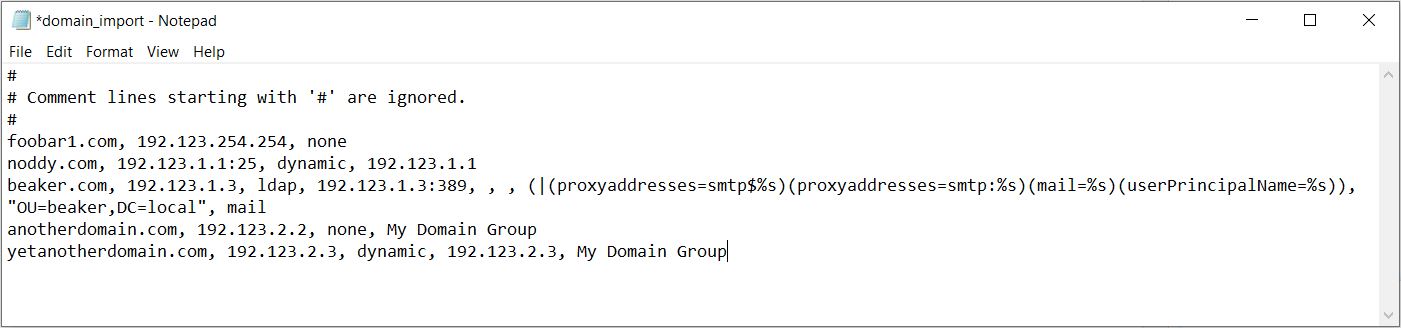
Below is an example of a CSV file. Note that:
-
Blank lines and comments are ignored.
-
Any field containing a comma ’,’ must be contained in quotes.