Enabling ARC Signing
Source: docs.titanhq.com Product: SpamTitan Imported content type: docs_page Product stream: legacy
Enabling ARC Signing
Section titled “Enabling ARC Signing”Go to System Setup > Mail Authentication > ARC Signing and follow the steps below to enable ARC signing. If your DNS service is provided by a domain name registrar, contact that registrar to update your DNS records.
-
Click the select
 icon in the Options column to the right of the ARC key you want to use.
-
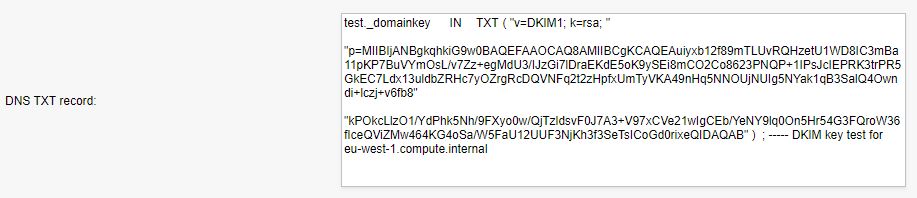
The DNS TXT record displays as shown:
-
Copy the DNS TXT record to a text editor and remove all spaces, carriage returns, and double-quotes. Select and highlight the following only and add this record to your domain’s DNS records:

-
SpamTitan attempts to detect the presence of these records and verify that they are correct. Click Save to force a check. ARC Signing will be displayed as either:
-
Verification pending: verification has yet to be performed against this domain (e.g. ARC signing disabled).
-
Verified.
-
Only Enable ARC signing for a domain once the DNS TXT record has been published and verified to be correct. Once this is done, then the ARC header will be added to inbound messages.